How to Stop Card-Testing Fraud on Your WordPress Store
| Quick Answer: If you are receiving orders for a product called “WooCommerce Automated Testing Product,” your store is being targeted by a card-testing attack. Bots are using this commonly forgotten placeholder product to verify stolen credit card numbers. The fastest fix: delete or set this product to Draft status immediately, disable guest checkout, and enable checkout rate limiting in WooCommerce. Read on for the full explanation and complete protection checklist. |
Why You’re Seeing These Orders
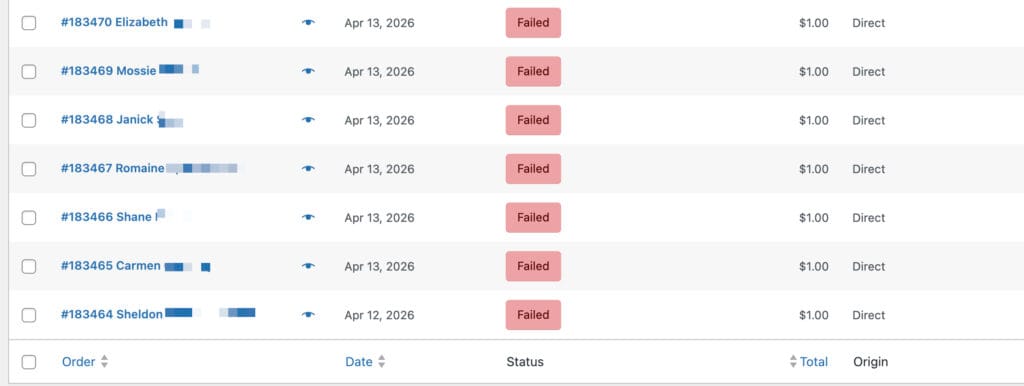
You log into your WooCommerce dashboard and notice a string of unusual orders — all for the exact same product: “WooCommerce Automated Testing Product” at $1.00. Most show a failed or declined payment status. Your inbox might be flooded with order notification emails. If this is happening to your store, you are not alone, and you are not imagining things. This is a well-documented fraud pattern that affects thousands of WordPress store owners every year.
The bad news: your store is being actively targeted by automated bots running what is known as a card-testing attack. The good news: it is entirely fixable, and this guide will walk you through exactly what to do.
What Is the “WooCommerce Automated Testing Product”?
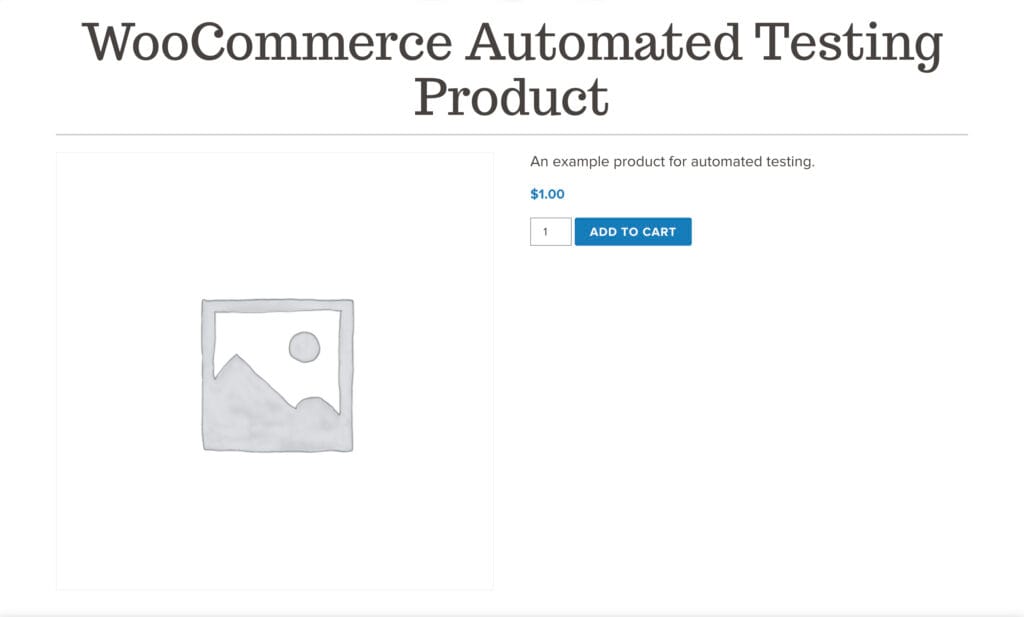
The WooCommerce Automated Testing Product is a hidden placeholder item that WooCommerce — or a developer working on your site — creates to safely test checkout flows, payment gateway connections, and order notification emails. It is priced at $1.00 specifically so it can trigger a real transaction without costing much during testing.
The problem is what happens after the testing is done. Developers finish their work, the site goes live, and this product gets left behind — often set to Private status, which most site owners mistakenly believe makes it inaccessible. It does not.
Here is the critical distinction: a Private product in WooCommerce does not appear in your public shop catalog, but it is still accessible via its direct URL. And because this product has the exact same name across thousands of WordPress installations worldwide — a quick Google search for the phrase returns millions of matching results — bots already know the URL pattern. They do not need to find it. They already have it.
What Is a Card-Testing Attack?
Card testing (also called carding) is a type of fraud where criminals who have obtained stolen credit card numbers need to verify whether those cards are still active before using them for larger purchases. They do this by making many small, low-value purchases in rapid succession.
Your WooCommerce store — specifically this forgotten $1.00 product — is the perfect target for several reasons:
- The low price minimizes the financial exposure if a card is caught
- The product is often accessible without requiring account creation (guest checkout)
- The consistent product name across sites makes it trivially easy for bots to find
- Many store owners do not monitor failed orders closely, giving bots time to run undetected
Once bots confirm a card works on your checkout, that card data gets flagged as “live” and is then used — or sold — for much larger fraudulent purchases elsewhere.
The Real Damage This Causes Your Business
A few failed orders might seem like a minor inconvenience, but the downstream effects are serious:
Transaction Fees on Declined Cards
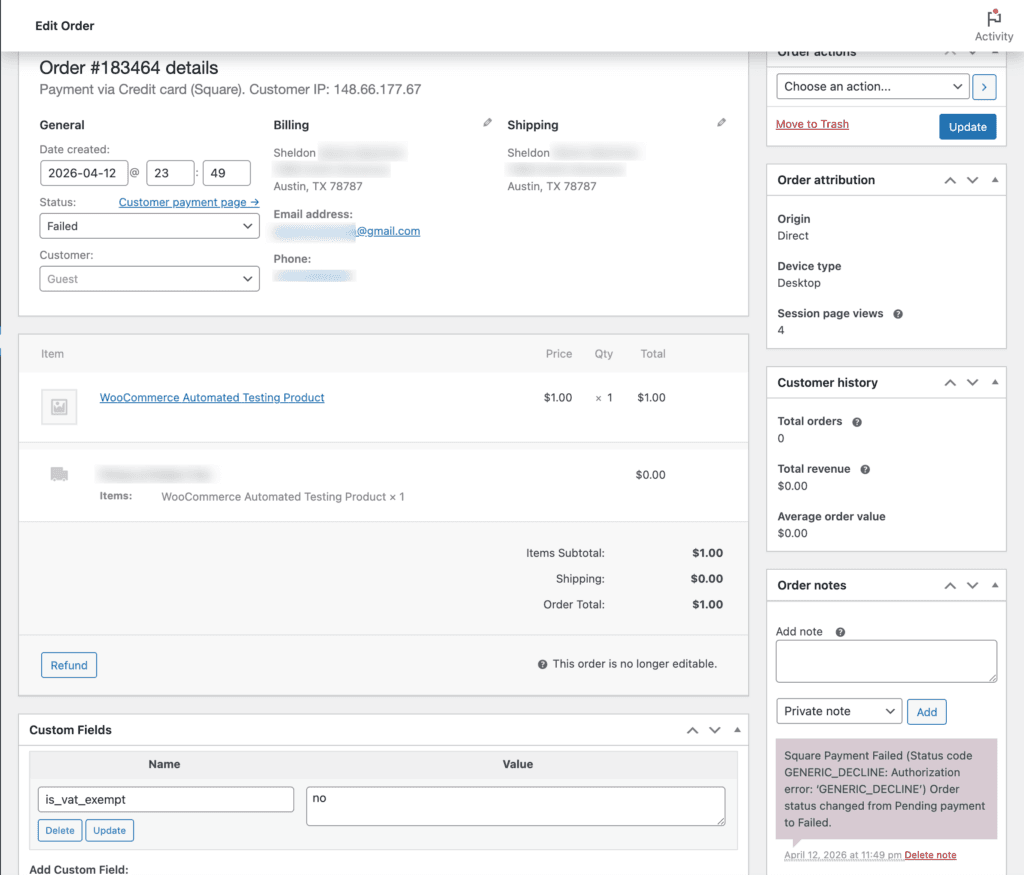
Many payment processors charge a small fee for every authorization attempt, even declined ones. When bots send dozens or hundreds of attempts in a single day, those small fees add up quickly.
Chargeback Risk
If any of the card tests succeed and the actual cardholder later disputes the charge, you receive a chargeback. Chargeback rates above 1% can trigger warnings from Stripe, PayPal, and other processors. Sustained high rates can result in account suspension or termination — cutting off your ability to accept payments entirely.
Fake Customer Accounts
Unless guest checkout is disabled, each bot attempt may create a new customer account in your WooCommerce database using a fake or stolen email address. These accounts clutter your customer list and, critically, if your WooCommerce store is connected to an email marketing platform like Mailchimp, Kit (formerly ConvertKit), or Klaviyo, those fake email addresses can be automatically added to your subscriber list.
When you send your next newsletter or automated email sequence, those addresses bounce. Email providers track bounce rates closely. High bounce rates damage your sender reputation, causing legitimate emails to land in spam folders — harming your ability to reach real customers.
Server Performance
High-volume bot traffic hammering your checkout page can slow down your site for real customers, affecting user experience and potentially impacting your Google search rankings.
Immediate Actions: Stop the Attack Now
If you are actively receiving these orders, take these steps immediately:
Step 1: Delete or Draft the Product
Navigate to Products in your WooCommerce dashboard and search for “WooCommerce Automated Testing Product.” If you find it:
- If you do not need it for future testing, delete it permanently.
- If you want to keep it for occasional testing, change its status to Draft — not Private. A Draft product is not accessible by URL. A Private product is.
This single step eliminates the entry point bots are using. It should be done first, before anything else.
Step 2: Disable Guest Checkout
Bots prefer guest checkout because it requires no account creation, making rapid-fire attempts faster and harder to detect. To disable it:
- Go to WooCommerce > Settings > Accounts & Privacy
- Uncheck “Allow customers to place orders without an account”
- Save your changes
Requiring account creation before purchase adds friction that stops most bots, though it may slightly reduce conversion rates for legitimate customers. For most stores under attack, the tradeoff is worth it until protections are in place.
Step 3: Enable WooCommerce Checkout Rate Limiting
WooCommerce includes a built-in rate limiting feature that caps how many checkout attempts can be made in a given time window from a single IP address:
- Go to WooCommerce > Settings > Advanced > Features
- Enable the Checkout rate limiting toggle
- Save changes
This throttles bot activity even if they find another entry point on your site.
Technical Protections: Locking Down Your Checkout
If the attacks continue even after removing the product, bots may be targeting your checkout API directly rather than the product page. These additional measures provide deeper protection.
Add reCAPTCHA to Your Checkout Page
Standard bot protection plugins often focus on login and registration forms but miss the checkout page entirely. The WooCommerce checkout endpoint can still be hammered via direct POST requests. Adding a CAPTCHA challenge specifically to the order submission step stops the majority of automated attempts.
Recommended plugins: reCAPTCHA for WooCommerce or Checkout with CAPTCHA for WooCommerce. Look for solutions that support Google reCAPTCHA v3 (invisible) or hCaptcha for minimal disruption to real customers.
Install an Anti-Fraud Plugin
Anti-fraud plugins analyze order patterns in real time and automatically hold or cancel suspicious orders before they reach your payment processor. Common signals they look for include:
- Multiple orders from the same IP in a short time window
- Billing and shipping addresses in different countries
- High-risk email domains (disposable email services)
- Velocity patterns consistent with automated testing
Recommended tools: WooCommerce Anti-Fraud (available in the WooCommerce marketplace) and FraudLabs Pro, which offers a free tier for lower-volume stores.
Cloudflare Bot Protection
If your site runs behind Cloudflare (free or paid), you have access to powerful bot mitigation tools:
- Bot Fight Mode (available on the free plan) challenges requests that look automated before they reach your server
- Turnstile is Cloudflare’s privacy-friendly CAPTCHA alternative that can be deployed on specific pages including checkout
- Firewall Rules (paid plans) let you block or challenge traffic from specific countries, ASNs, or IP ranges that show high fraud rates
Cloudflare operates at the network edge, meaning bot traffic gets stopped before it even hits your server — reducing load and preventing API-level attacks.
Keep Payment Gateway Plugins Updated
Older versions of payment gateway plugins — including PayPal Payments for WooCommerce and the Stripe plugin — have had vulnerabilities that sophisticated bots have exploited. Ensure all payment-related plugins are running their latest versions. Check for updates under Plugins > Installed Plugins in your WordPress dashboard, and consider enabling automatic updates for these critical components.
Audit Your Store: The Post-Attack Cleanup Checklist
After stopping the active attack, do a full cleanup of your store:
| Post-Attack Cleanup Checklist 1. Delete or Draft the testing product 2. Review all failed/cancelled orders from the past 7 days and delete bot-generated ones 3. Purge fake customer accounts created during the attack (check customer emails for patterns like random strings or known disposable domains) 4. If connected to email marketing: remove recently-added contacts that you do not recognize, and run a list cleaning pass 5. Check your payment processor dashboard for any chargeback notices or warnings 6. Review your WordPress users list for any suspicious accounts created during the same window 7. Update all payment gateway plugins and WooCommerce core |
The Email Deliverability Problem You May Not Have Noticed
This is one of the most overlooked consequences of a card-testing attack. Here is how it unfolds:
Many WooCommerce stores are connected to email marketing platforms through integrations or plugins. Every new customer account created during checkout — legitimate or bot-generated — can trigger an automatic subscriber addition. After a card-testing attack that generates dozens or hundreds of fake accounts, your subscriber list may now contain hundreds of bad email addresses you never intended to add.
When you send your next campaign, those addresses bounce. Email service providers track your bounce rate. Persistent rates above roughly 2% begin to harm your sender reputation, which determines whether your emails land in inboxes or spam folders across all your subscribers — including the real ones.
After an attack: audit your email list, remove recently-added contacts with suspicious email patterns (random alphanumeric strings, disposable domain services like mailinator.com or guerrillamail.com), and run a list verification tool before your next send.
Why “Private” Is Not the Same as Hidden
This is the most common misconception that makes stores vulnerable in the first place. In WooCommerce, product visibility settings work like this:
| Status | Shows in shop catalog? | Accessible via URL? |
| Published | Yes | Yes |
| Private | No | YES — still accessible |
| Draft | No | No — safe |
Private status was designed for situations where you want to share a product link with a specific person (like a wholesale customer) without displaying it publicly. It was never intended as a security measure. Draft status is what actually prevents URL-based access — and it is what you should use for any test product you want to preserve.
Frequently Asked Questions
I never created a “WooCommerce Automated Testing Product” — how did it get there?
This product is often created automatically during the initial setup of WooCommerce or certain payment gateway plugins during their testing phase. It can also be created by a developer who set up or tested your store. Because it is created programmatically in the background, many site owners are unaware it exists. Check your full product list — including Private and Draft products — by going to Products > All Products and looking for it there.
The product was set to Private. Isn’t that secure enough?
No. Private products in WooCommerce are still fully accessible via their direct URL. They simply do not display in your shop catalog or search results. Since the WooCommerce Automated Testing Product has the same name (and often the same URL slug) across many installations, bots do not need to search for it — they already know the URL pattern. Set it to Draft or delete it.
All the orders show as failed or declined. Is that still a problem?
Yes. Even failed authorization attempts can generate transaction fees from your payment processor. More importantly, each attempt still hits your server, and many may have created guest customer accounts in your WooCommerce database. Those fake accounts can flow into your email marketing list and cause bounce-related deliverability issues. The volume of attempts can also flag your account with your payment processor.
How did bots find my product URL?
The WooCommerce Automated Testing Product has a predictable URL slug (typically something like /product/woocommerce-automated-testing-product/ or similar). Because thousands of sites have this same product with the same slug, bots are pre-programmed to target it. A Google search for the exact product name returns millions of indexed pages — many of which are real product pages on live stores, confirming just how widespread this issue is.
Should I disable guest checkout permanently?
Disabling guest checkout is a highly effective bot deterrent. For service-based businesses or stores where the checkout process involves account-specific details, it makes sense to keep it disabled. For e-commerce stores where convenience is a conversion priority, you can re-enable it after adding reCAPTCHA and anti-fraud protections to your checkout page. The two measures together address the risk that guest checkout creates.
Will these orders affect my payment processor account?
They can. Payment processors monitor fraud rates, and a spike in failed authorization attempts can trigger a review. High chargeback rates (above roughly 1%) can result in account warnings, reserve holds, or in serious cases, account termination with Stripe, PayPal, or Square. Address the issue quickly and proactively reach out to your payment processor if you have seen a significant volume of fraudulent attempts.
My email marketing list suddenly has hundreds of new subscribers I don’t recognize. Is this related?
Almost certainly yes. If your WooCommerce store is integrated with your email marketing platform and configured to add new customers or accounts to your list automatically, each fake account created during the bot attack would have been added as a new subscriber. Audit your list, remove recently-added contacts with suspicious email patterns, and run those addresses through a list cleaning service before your next send to protect your deliverability.
Is Cloudflare free plan sufficient, or do I need paid protection?
Cloudflare’s free plan includes Bot Fight Mode, which provides meaningful protection for most small stores. For stores that experience repeated or sophisticated attacks, Cloudflare Pro or Business plans add more granular firewall rules, rate limiting controls, and enhanced bot analytics. Start with the free plan — for the majority of WooCommerce stores, it is sufficient when combined with the plugin-level protections described in this guide.
How do I clean up the fake customer accounts the bots created?
Go to WooCommerce > Reports > Customers or directly to your WordPress Users list. Filter by registration date to the period of the attack. Look for accounts with suspicious email patterns: random alphanumeric strings, known disposable email domains (mailinator.com, guerrillamail.com, yopmail.com, etc.), or identical naming patterns. Delete those accounts. If you are also syncing to an email platform, remove them there as well and submit the addresses to your platform’s suppression/unsubscribe list.
Do I need a developer to fix this, or can I do it myself?
The core fixes — deleting or drafting the product, disabling guest checkout, and enabling rate limiting — are straightforward and require no development experience. Installing a reCAPTCHA plugin is also accessible for most site owners. More advanced configurations like Cloudflare firewall rules or custom anti-fraud rule tuning may benefit from developer assistance. If you are unsure or want professional help, a WooCommerce security audit from a qualified WordPress professional can address all of these issues systematically.
Preventing Future Attacks: Ongoing Security Practices
Addressing this specific vulnerability is important, but it is also an opportunity to build better security habits across your WooCommerce store:
- Conduct a product audit twice a year — review all Draft, Private, and out-of-stock products to ensure nothing unexpected is publicly accessible
- Monitor your failed orders dashboard weekly — an unusual spike in failed payments is often the first visible sign of bot activity
- Use a WordPress security plugin like Wordfence or Solid Security (formerly iThemes Security) to log and block suspicious login and checkout behavior
- Subscribe to WooCommerce security advisories so you are notified of vulnerabilities in core or plugins before bots exploit them
- Keep WordPress, WooCommerce, and all plugins updated — this is the single highest-leverage security action available to any site owner
Need Help Securing Your WooCommerce Store?
If you have experienced a card-testing attack or are concerned about the security and performance of your WooCommerce store, we can help. At Hill Media Group, we work with small business owners to make sure their websites are not just functional and well-marketed — but protected against the threats that can silently undermine their business.
| Schedule a free 15-minute Digital Growth Strategy Session Book your free strategy session at hillmediagroup.com |
We will review your current setup, identify vulnerabilities, and give you a clear action plan — even if you decide not to work with us afterward. That is the education-first approach we bring to every conversation.
About the Author
Jerad Hill is the founder of Hill Media Group, a digital marketing agency based in Kalispell, Montana. With over 20 years of WordPress experience and having taught WordPress and Elementor to more than 120,000 students through online courses, Jerad specializes in helping small businesses build secure, high-performing websites that generate real business results.
